Preliminaries
需要首先配置用户名和邮箱
Git Add
add files
修改之后, 需要将修改的内容放到git缓冲区中.
添加指定路径的文件:
git add <path>这里的path可以是folder也可以是file, 可以有修改也可以没有. 但是如果当前的缓冲区中没有任何修改, 那么后续的commit会出错.
常用命令
将当前文件夹下所有修改的文件添加到git缓冲区:
git add .
将当前整个git repo的修改的文件添加:
git add -Aadd hunks
通过下面的指令, 进入tui界面, 添加hunks:
git add -pTUI:
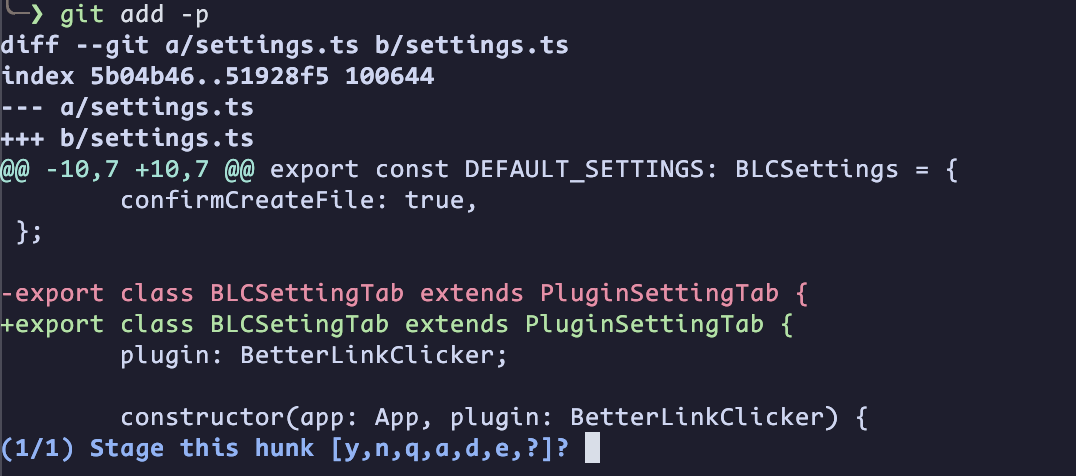 输入字母, 然后按下回车, 对该hunk进行操作. 每个字母的含义为:
y: yes, stage this hunkn: no, not stageq: quita: stage this hunk and all later hunks in this filed: do not stage this hunk and all later hunks in this filee: manually edit this hunk in git editor: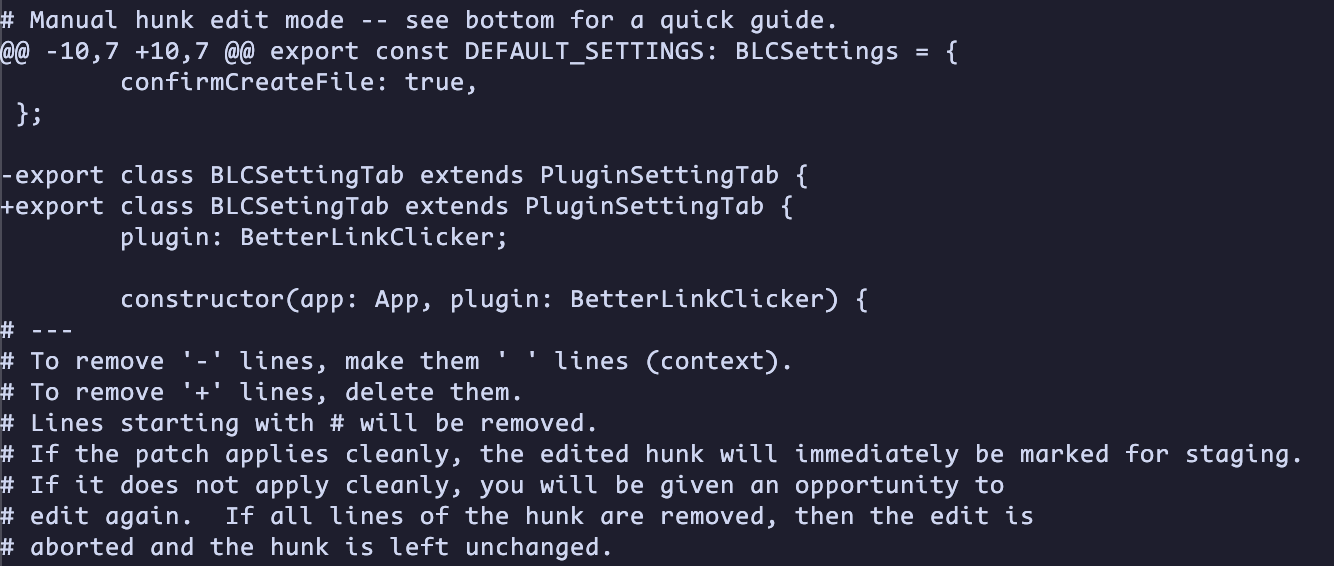
?: help
Commit Changes
如果缓冲区中有修改, 可以将修改commit到stage区:
git commit -m "<commit_message>"使用commit的时候会生成当前commit的hash, 可以切换到hash对应的commit中. 这个hash与用户名, 用户邮箱, commit messages, git changes等相关
可以使用editor进行commit提交:
git commit -eeditor中展示:
# Please enter the commit message for your changes. Lines starting
# with '#' will be ignored, and an empty message aborts the commit.
#
# On branch master
# Your branch is up to date with 'fork/master'.
#
# Changes to be committed:
#       modified:   settings.ts
#
# Untracked files:
#       pnpm-lock.yaml
#
<add commit messages here>
然后保存退出editor, 即可添加commit
修改commit
修改commit message
使用下面的代码进行修改commit:
git commit --allow-empty --amend --only -m "<new_message>"将新的修改添加到上一条commit中
首先将修改后的内容添加到git缓冲区中:
git add <path/to/changes>然后将这个修改附加到上一条commit中(只能是最近的上一条):
git commit -a --no-edit将一条commit合并到之前的commit中
如果需要将新的修改合并到多条之前, 使用下方的方法:
将修改创建一个临时的commit:
git commit --fixup <commit_hash>
# equal to: `git commit -m "fixup! <messages>"`这里的commit_hash是你希望合并到的commit的hash
此时检查log的结果应该是:
<hash4> fixup! bbb
<hash2> ccc
<hash2> bbb
<hash1> aaa
然后, 进行交互式rebase:
git rebase -i HEAD~3其中, HEAD~3的意思是, 使用相对commit信息, 使用距离当前HEAD最近的三个commit进行rebase
此时会打开一个editor, 内容应该如下所示:
pick <hash2> bbb
pick <hash3> ccc
pick <hash4> fixup! bbb

# Rebase ...
#
# Commands:
# p, pick = use commit
# f, fixup = like "squash", but discard this commit's log message
# s, squash = use commit, but meld into previous commit
将fixup!的commit移动到合并目标的下方, 并将pick改成f或者fixup, 结果如下:
pick <hash2> bbb
f <hash4> fixup! bbb
pick <hash3> ccc

# Rebase ...
#
# Commands:
# p, pick = use commit
# f, fixup = like "squash", but discard this commit's log message
# s, squash = use commit, but meld into previous commit
# ...
保存并退出editor, 此时会自动触发rebase.
rebase之后的log应该为:
<new_hash3> ccc
<new_hash2> bbb # <- this commit include the fixup commit
<hash1> aaa
此时合并结束.
如果要上传远程, 可能需要使用--force或者--force-with-release强制推送
Git Commit Author Modification
在 Git 中修改已提交的用户名称和邮箱是一种重写历史的操作. 这意味着相关提交的哈希值将会发生改变. 根据修改范围的不同, 可以采用不同的策略. 如果代码已经推送到远程仓库, 修改后必须强制推送才能覆盖远程记录, 这可能会影响其他协作者.
Amending the Latest Commit
这是最简单的场景, 适用于刚刚完成提交但尚未推送到远程仓库, 或者仅需要修正最近一次提交信息的情况. 通过特定参数, 可以直接用新的作者信息覆盖上一次的提交记录, 而无需产生新的提交节点.
git commit --amend --author="New Name <new@example.com>" --no-editModifying Historical Commits
当需要修改过去某几次的提交, 或者非最近一次的提交时, 需要使用交互式变基工具. 这种方法允许用户查看一段历史记录, 并指定需要修改的特定节点.
操作流程通常从启动变基开始, 指定要回溯的提交数量. 在弹出的编辑器中, 将需要修改的提交前的指令从 pick 改为 edit. 保存并退出后, Git 会暂停在标记的提交处. 此时, 再次执行上述的修正命令来更新作者信息. 完成后, 继续变基过程直到所有标记的提交都修改完毕.
git rebase -i HEAD~3
# 在编辑器中将 pick 改为 edit
git commit --amend --author="New Name <new@example.com>" --no-edit
git rebase --continue