Git Architecture
Git 管理文件时有三层:
- 工作区 (Working Directory)
- 你实际看到和编辑的文件(本地目录里的代码)。
- 暂存区 (Staging Area / Index / Cache)
- 记录哪些文件将会进入下一个 commit。
- 通过
git add把工作区的改动放入暂存区。
- 版本库 (Repository / .git/objects)
- 历史提交记录,持久化存储。
- 远程仓库, 多人合作
graph LR

工作区-->|git add|a(暂存区)
a-->|git push|repository
file state
文件可能处于以下几种状态:
- 未追踪 (untracked):Git 没有管理这个文件。
- 已追踪 (tracked, unchanged):文件在版本库中,当前没有改动。
- 已修改 (modified):文件在工作区被改动,但还没
git add。 - 已暂存 (staged):文件改动被
git add放进了 cache。 - 已提交 (committed):暂存区的内容被
git commit保存到版本库。
Command
Add to Staging Area
Git Add
add files
修改之后, 需要将修改的内容放到git缓冲区中.
添加指定路径的文件:
git add <path>这里的
path可以是folder也可以是file, 可以有修改也可以没有. 但是如果当前的缓冲区中没有任何修改, 那么后续的commit会出错.常用命令
将当前文件夹下所有修改的文件添加到git缓冲区:
git add .将当前整个git repo的修改的文件添加:
git add -Aadd hunks
通过下面的指令, 进入tui界面, 添加hunks:
git add -pTUI:
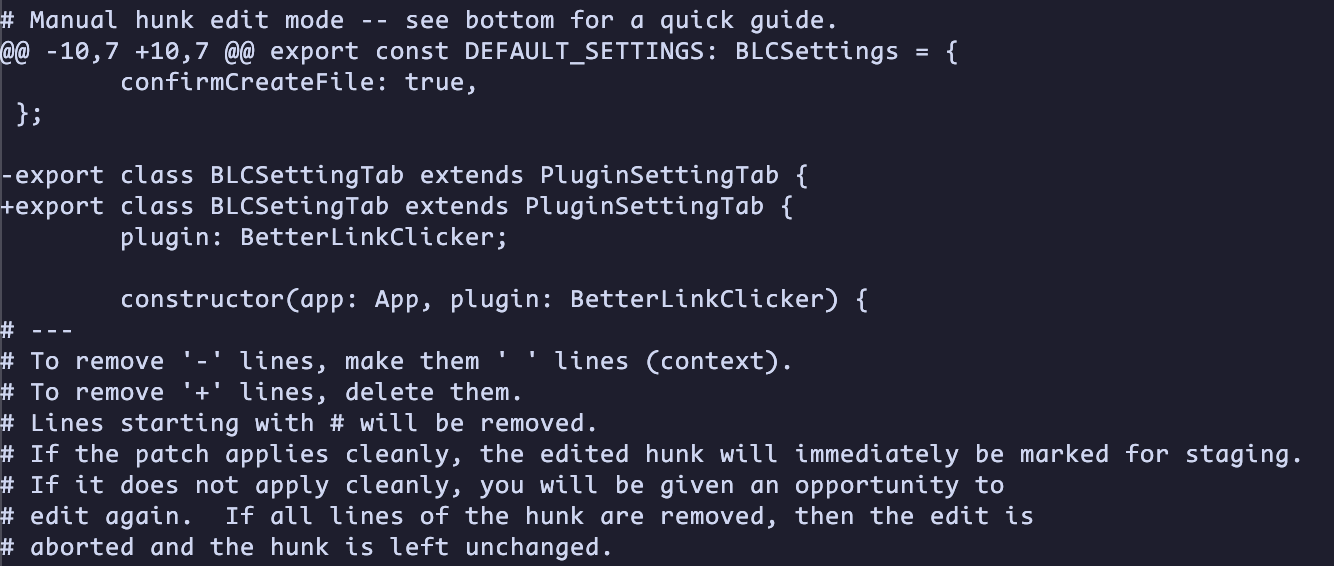
输入字母, 然后按下回车, 对该hunk进行操作. 每个字母的含义为:
Link to original
y: yes, stage this hunkn: no, not stageq: quita: stage this hunk and all later hunks in this filed: do not stage this hunk and all later hunks in this filee: manually edit this hunk in git editor:?: help
Remove from Staging Area
git rm --cached <file>- 移除文件在 cache 的记录,但不会删除工作区的文件。
- 常用于让已有的文件被 .gitignore 忽略
git rm <file>- 移除 cache 中的记录,同时删除工作区的文件。
Reset Staging Area
git reset <file>- 让文件从 cache 回到工作区已修改的状态(取消暂存)
- 例子:
git reset main.py
Check Status
git status- 显示哪些文件在缓存区,哪些只在工作区。
Check Files in Staging Area
git ls-files --stage- 显示当前缓存区里有哪些文件、对应的哈希值和权限。